


Note: Product visuals are presented for illustrative purposes only and may vary slightly in colour, finish, proportions, and final installed appearance. For the most realistic representation, please refer to our Customer Gallery featuring actual installation photos.


Why it matters
Built for how you actually get home.
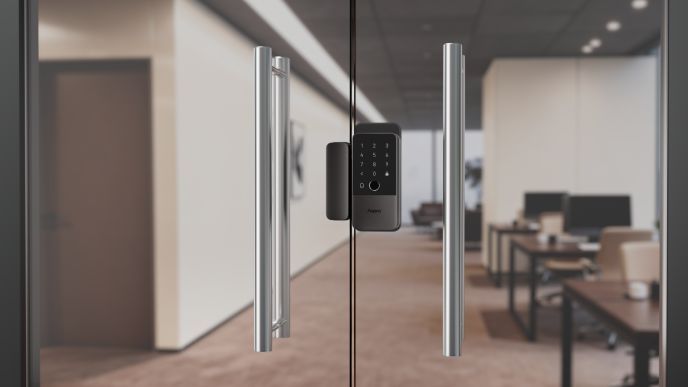
A Smart Lock Built for Frameless Glass Doors
The Aqara U500 Glass Door Lock clamps onto frameless glass doors without drilling — a genuinely different installation method from locks designed for wood or metal, which need a mortise cut into the door itself. That makes it a practical option for offices, shopfronts and homes with a frameless glass entrance where drilling into the glass simply isn't an option.
Ways to Unlock
Fingerprint, PIN code, NFC card, Apple Home Key, the Aqara and Matter apps, voice control, and a mechanical key backup — seven methods in total, plus remote unlock through a paired Matter controller.
Matter over Thread
Built on Matter over Thread, the U500 connects natively to Apple Home, Alexa, Google Home and SmartThings without a proprietary bridge, and supports Siri and Alexa voice unlock directly — useful when your hands are full and you'd rather just ask than reach for a keypad.
Auto-Lock & Alerts
The lock auto-locks as soon as the door closes, and will alert you if the door is left not-closed or not-locked — useful for glass doors in busy retail or home entryway settings where a door left ajar is easy to miss visually against a glass background.
Power & Weatherproofing
Runs on 4x AA batteries for up to 7 months per set, with an IP65-rated exterior panel and a USB-C emergency charging port as backup.
| Model | DL-D20D (Glass Door Lock U500) |
|---|---|
| Lock Type | Rear lock knob + glass door fixing clamp; clamp-on installation for frameless glass doors, no drilling required |
| Unlocking Methods | Fingerprint, Password, Temporary Password, Mechanical Key, NFC, Phone Bluetooth unlock; Voice unlock, Apple Home Key, Samsung Wallet NFC, and Matter unlock all require an Aqara gateway/hub |
| Connectivity | Thread, Bluetooth, NFC built-in; Matter/Home Key/voice/remote functions require an Aqara gateway (hub) |
| Power Source | 4x AA (LR6) 1.5V batteries; Type-C power supply, 5V/1A |
| Warranty | 2 Year Parts and On-Site Warranty. Other accessories not included. |
| Dimensions | Inner Panel: 167 x 72.5 x 52.5mm; Outer Panel: 146.3 x 69.3 x 32mm |
| Net Weight | Approx. 1605g |
| Door Thickness Range | 8 - 12mm (glass panel) |
| Door Seam Range | 5 - 10mm |
| IP Rating | Outer Panel: IP65; Inner Panel: IP54 |
| Operating Temperature | Inner Panel: -18C ~ +50C; Outer Panel: -35C ~ +66C |
| Operating Humidity | 0 ~ 93% RH, no condensation |
| Fingerprint Capacity | Up to 50 |
| Password Capacity | Up to 75 PIN codes |
| NFC Card Capacity | Up to 25 |
| Door Lock Status Alerts | Unlocked, Locked, Door Opened, Door Closed, Lock Bolt Abnormal |
| Features | Away mode, Do Not Disturb mode, remote control (via hub), automatic locking, volume-based voice control, electronic deadbolt, door status detection, camera linkage |
| Alarm Features | Multiple verification failure alarms, low battery alarms, door not closed/unlocked alarms, mechanical/latch abnormality alarms |
| What is in the Box | Smart Glass Door Lock U500 x1, Strike Box x1, Mechanical Keys x2, AA batteries x4, Accessories Kit x1, Installation Diagram x1, User Manual x1 |
Frequently Asked Questions
Have questions? We're here to help you.
You can install the Aqara U500 by following the Aqara Home app instructions, scanning the QR codes on the user manual or packaging, or visiting the Aqara Smart Glass Door Lock U500 product support page.
Remove the battery, check whether the bolt extends and retracts smoothly, adjust the bolt box if needed, and make sure the connector wire is not interfering with the tailpiece. If the issue persists, verify the door cavity and frame alignment, then contact customer service.
The Aqara Smart Glass Door Lock U500 is designed for frameless glass doors with a thickness between 8 mm and 12 mm.
No. The Aqara U500 supports all door opening directions, including left or right swing doors and inward or outward opening.
No. The lock cylinder is fixed inside the lock, and self-disassembly may cause you to forfeit Aqara’s repair service.
No. The Aqara U500 uses Thread instead of Wi-Fi, which offers better stability and longer battery life.
Recalibrate the lock through the Aqara Home app under Settings > Installation and Calibration, or use the local setup menu by pressing the setup button and selecting door lock calibration. If the issue continues, check the installation and contact customer service.
The Aqara U500 uses Bluetooth 5.3, Thread with Matter 1.4, and NFC.
The Aqara U500 has passed certifications including CE, MFi, Matter, Aliro, Thread, IP65, RCM, and more.
The outer keypad panel has an IP65 waterproof rating, while the inner panel has an IP54 waterproof rating.
The outer panel operates from -35°C to +66°C, while the inner panel operates from -18°C to +50°C. The supported humidity range is 0 to 93% RH, non-condensing.
The touch panel uses frosted PMMA, while the outer panel, inner panel, and dial are made of aluminum alloy with a scratch-resistant surface coating.
For Aqara Home users, the lock must be bound to a Thread-enabled Aqara Matter controller such as Hub M3. For third-party Matter ecosystems, a Thread-enabled Matter controller from that ecosystem is required.
You need a Thread-capable Matter controller. Remove the inner battery cover, press the setup button once to enter pairing mode, then scan the Matter setup QR code using your preferred third-party app.
As of December 2025, supported Aqara controllers include Aqara Hub M3, Hub M100, Hub M200, Doorbell Camera Hub G410, and Camera Hub G5 Pro.
No. The lock can still be used in the Aqara Home app via Bluetooth for functions such as adding fingerprints, setting timed users, and gyroscope-based auto-locking. However, remote control and automations require a Thread-enabled Matter controller.
Yes. You can scan the Matter pairing code to connect the Aqara U500 directly to Apple Home or another Matter ecosystem, but you need a Thread-enabled Matter controller for that ecosystem.
No. An Aqara Thread-enabled Matter controller can enable remote features and generate Matter pairing codes in Aqara Home, but third-party ecosystem features require a Thread-enabled Matter controller from that specific ecosystem.
Make sure the lock is in pairing mode, Bluetooth and Wi-Fi are enabled, IPv6 is enabled on your network, and your phone and Thread border router are on the same Wi-Fi network. If needed, generate a new Matter pairing code or clear existing Matter data before rebinding.
Press the setup button once to ensure the lock is in pairing mode, then scan the Aqara pairing code again. Make sure Bluetooth and network access are enabled. If the issue persists, reset the lock and retry.
If the lock is not connected to a hub, it may appear offline when Bluetooth is lost. If it is connected to a hub, restart both the hub and the lock, then check that both are updated to the latest software.
The current version of the lock only supports door status display when connected via Bluetooth.
The Aqara U500 supports eight unlocking methods: fingerprint, password, NFC with Apple Home Key, automation, voice control, remote unlock, Bluetooth unlock, and mechanical key.
The mechanical key is mainly for emergencies when fingerprint, password, app, NFC, or Home Key unlocking is unavailable. Aqara recommends keeping the key somewhere outside the home, such as in your car or office.
In Aqara Home, the lock supports up to 50 fingerprints, 75 passwords, 25 NFC devices, and 100 users. For Matter credentials, it supports up to 35 passwords, 35 NFC devices, and 20 users.
Aqara Home passwords can be 6 to 10 digits, while third-party Matter passwords can be 4 to 8 digits. Dummy passwords are supported, allowing random digits before or after the correct password, up to a total of 20 digits.
Yes. Temporary single-use passwords can be generated remotely through the Aqara Home app, with up to 8 active single-use passwords at the same time.
Yes. Scheduled passwords can be created in the Aqara Home app for specific time periods and recurring schedules, such as every Monday from 10 a.m. to 2 p.m.
Yes. Apple Home supports Siri voice unlocking with an Apple Thread-enabled home hub, while Amazon Alexa supports voice unlocking with a compatible Thread-enabled Matter controller and a pre-configured voice unlock password.
Yes. Remote unlocking is supported through the Aqara Home app or third-party ecosystems when the lock is connected to a Thread-enabled Matter controller.
Yes. Door not locked and door not closed alerts are enabled by default and can be configured in the Aqara Home app under Voice and Sound Settings.
The lock has default alerts if the door is not locked after 5 seconds or not closed after 10 seconds. You can adjust or disable these alerts in the Aqara Home app under Voice and Sound Settings.
By default, the lock disables verification for 30 minutes. During this time, you can unlock using the app or mechanical key. After 30 minutes, verification functions return to normal.
Install the Aqara Home app, add the lock, and press the unlock icon on the app home screen. Bluetooth must be enabled during the binding process.
Open the rear battery compartment, press and hold the reset button for 5 seconds, then follow the voice prompts and verify administrator credentials to reset the lock.
In the Aqara Home app, go to the lock page, select Settings > Installation and Calibration, then choose Door Lock Calibration and follow the prompts.
You can enable Away Mode in the Aqara Home app under the lock’s Away Mode settings, or directly on the front keypad by pressing 0 + 0 + Lock.
After an OTA update, restart, or calibration, the lock may show an unknown state. Open the door, close it from the inside, and lock it again so the lock can detect the correct door status.
The initial administrator is created when the lock is first added to the Aqara Home app. This administrator can add more administrator accounts through direct Bluetooth connection in the app.
The Aqara Home app supports regular, temporary, and admin permissions. Regular users can use standard unlocking functions, while temporary users are limited to temporary password access.
Firmware can be updated through Bluetooth OTA in the Aqara Home app or Matter OTA through Apple Home. Updates cannot be scheduled or rolled back.
The lock alerts users when the battery voltage is low. If the battery is depleted while you are outside, you can temporarily power the lock through the emergency USB-C port using a power bank or a phone that supports USB-C to USB-C charging.
The Aqara U500 can last up to 7 months on average, depending on usage, environment, and temperature. Aqara’s battery test is based on 15 door openings and 15 automatic lock engagements per day at 25°C.
After setting up the Aqara U500 in the Apple Home app, a Home Key will be added to Apple Wallet. You can then use a compatible iPhone or Apple Watch to unlock the door.
Apple Home Key requires a Thread-enabled home hub, such as Apple TV 4K, HomePod 2nd generation, HomePod mini, or a compatible Thread border router. It supports iPhone XS and newer on iOS 18.6 or later, and Apple Watch Series 6 and newer on watchOS 11.5 or later.
Tap your iPhone or Apple Watch on the lock’s NFC zone. If Express Mode is enabled, no Face ID or passcode is required. If disabled, authentication is required before unlocking.
Yes. Tap-to-unlock can still work when your iPhone is out of battery or offline, as long as Express Mode is enabled.
With a connected Thread-enabled Apple home hub, you can invite other Apple users to join your home in the Apple Home app. Once they join, they can set up their own Home Key.
You can add fingerprints through the Aqara Home app after adding the lock, or through local lock settings by pressing the setup button, selecting user creation, and following the voice prompts.
Make sure your finger is dry and not severely worn. Fingerprint enrollment requires seven presses, so press your finger fully onto the sensor and vary the angle according to the app or voice prompts.
Make sure your finger is clean and dry, then press it fully onto the sensor. If failures continue, unlock with another method, delete the old fingerprint in the Aqara Home app, and register a new one.
Fingerprint recognition may be affected by shallow, incomplete, or worn fingerprints. For children or elderly users, password, NFC, or Apple Home Key unlocking may be more reliable.