


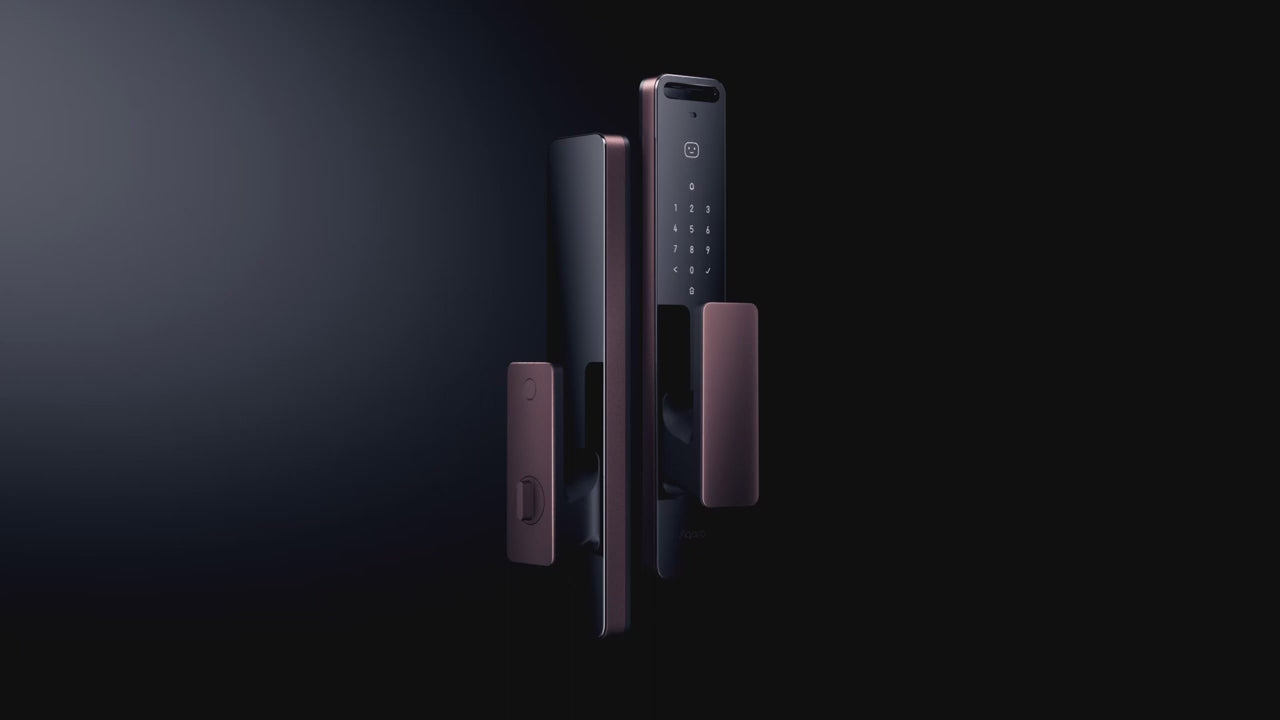


Note: Product visuals are presented for illustrative purposes only and may vary slightly in colour, finish, proportions, and final installed appearance. For the most realistic representation, please refer to our Customer Gallery featuring actual installation photos.


Why it matters
Built for how you actually get home.
The Smart Lock That Recognises Your Face
The Aqara D200i brings iPhone-style 3D facial recognition to your front door, alongside Apple Home Key and a full set of conventional access methods. It's built for households that want a genuinely touchless, hands-full-of-groceries entry experience without giving up backup options for the days that technology doesn't cooperate.
How the Face Recognition Actually Works
Most budget "facial recognition" locks use a simple 2D camera, which can sometimes be fooled by a printed photo held up to the lens. The D200i instead uses Aqara's own structured-light 3D mapping — the same underlying approach as Face ID on an iPhone — projecting a pattern onto your face and measuring its depth and contours rather than just comparing a flat image. That's what lets it unlock in about a second while still being meaningfully harder to spoof than a 2D system, and it continues to work reliably in the dark, since it doesn't depend on visible-light photography. A generously large recognition zone, roughly 1.3–2.0m from the door, also solves a problem plain fingerprint locks struggle with: a child's faint, not-yet-defined fingerprint, or an elderly parent's fingerprint worn smooth by age, both scan just as reliably as anyone else's face.
Ways to Unlock
Six access methods in total, covering biometric, digital and physical entry:
- 3D face recognition – unlocks in about a second using structured-light facial mapping, distinct from a simple 2D camera and far harder to fool with a photo.
- Apple Home Key – tap your iPhone or Apple Watch via NFC, no need to unlock your phone first. A more secure mode is also available that requires Face ID or a passcode on your phone before the door unlocks, for anyone who wants an extra check beyond a simple tap.
- PIN codes – permanent, one-time and periodic codes for guests, helpers or contractors, each expiring exactly when you want it to.
- NFC tags – up to 25 devices supported, handy for children or elderly parents who'd rather tap a card than remember a code.
- Aqara app – Bluetooth locally, or remote unlock via a paired Aqara Hub, with a full activity log of every entry so you always know who came and went, and when.
- Mechanical key – physical backup override for the day the electronics simply aren't the answer.
Store up to 50 face profiles and 50 PIN codes, with different access levels assignable per person — useful for multi-generation households where parents, kids, and a domestic helper all need different permissions and different hours of access.
Security & Privacy
The D200i carries BCTC (Bank Card Test Center) financial-grade security certification — the same standard used for banking hardware in China, and a meaningfully higher bar than most consumer smart locks bother to clear. Just as importantly for a face-scanning device: your facial data is processed and stored locally on the lock itself, never uploaded to any cloud server. That matters twice over — it means there's no remote database of your family's faces for anyone to breach, and it keeps the lock in line with Singapore's Personal Data Protection Act (PDPA).
Battery & Power
A rechargeable lithium battery lasts around 4 months per charge — shorter than a simple keypad lock, which is the trade-off for running a camera and face-mapping processor. To offset that, every D200i we sell includes a bonus second battery (worth $80), so you can swap in a fully charged spare in about thirty seconds and recharge the first one at your leisure, rather than the lock ever being out of action while you wait for it to charge. And if both batteries ever run out at once, the door still opens with the included mechanical key, or with a quick top-up from a power bank via the USB-C port.
Smart Home & Doorbell
The D200i integrates with Apple HomeKit and Google Home, and includes a built-in doorbell button on the exterior panel that pushes a notification straight to your phone through the Aqara app when someone presses it — one less separate doorbell device to install and wire up. Paired with other Aqara smart home devices, walking in the door can trigger the lights to switch on and the air-con to adjust automatically, while leaving can arm your cameras and switch off appliances you've designated — no extra button presses required.
Real installation photos from our customers.
| Model | ML-D01D |
|---|---|
| Lock Type | Mortise |
| Unlocking Methods | 3D Face Recognition, PIN Code, NFC Card, Apple Home Key, App/Bluetooth, Manual Key |
| Connectivity | Wi-Fi (2.4GHz, IEEE 802.11 b/g/n), Bluetooth 5.1, Zigbee, NFC built-in; remote/automation functions require an Aqara Hub (M1S, M2, G2H, G3, or E1 - sold separately) for Zigbee network connection |
| Power Source | Replaceable Lithium-Ion battery (7.25V, 1.5A); includes bonus second battery |
| Battery Life | Up to 4 months per charge |
| Warranty | 2 Year Parts and On-Site Warranty; 6-month battery warranty. Other accessories not included. |
| Fire-Rated Compatible | Yes |
| Dimensions | Outer Panel: 406 x 77 x 20mm; Inner Panel: 406 x 77 x 26mm |
| Net Weight | 4.4kg |
| Night Latch Mode | Deadbolt-style secondary lock, toggled via a dedicated button (press 3 seconds to activate/deactivate) |
| Operating Temperature | -10C ~ 55C |
| Operating Humidity | 0 ~ 93% RH, no condensation |
| IP Rating | IP52 (Face Module: IP64) |
| Ports | USB-C (5V, 2A) |
| Biometric & Access Capacity | Up to 50 face profiles, 50 PIN codes, 25 NFC devices |
| Security Certification | BCTC certified (financial-grade security); face recognition processing is local, on-device |
| Built-In Doorbell | Yes |
| What is in the Box | Outer Panel x1, Inner Panel x1, Lock Body x1, Mechanical Lock Cylinder x1, Emergency Key x2, Strike Plate x1, Accessory Package x1, Lithium Battery x2, Installation Diagram x1, User Manual x1 |
Frequently Asked Questions
Have questions? We're here to help you.
These are not included in the Aqara D200i (stand-alone usage) price:
- NFC tags which can be purchased from Interlock if some users such as elderly folks require the tags.
- An Aqara Hub for remote connectivity to Aqara D200i and integration with Apple Homekit / Home Key, Google Assist.
- Integration services for home automation platforms (can be provided by Interlock partners).
Aqara hub is not needed:
- for D200i standalone use i.e. Aqara Home App with Bluetooth connection to D200i lock.
- for D200i use with Apple Homekit (however, a hub is recommended for enhanced remote operations via Aqara App and Aqara Hub).
Aqara hub is needed:
- when D200i remote functions are needed (see other FAQ item).
- when D200i is used with Google Assist.
- for automation with other Aqara devices.
**Note:** D200i works only with Aqara Zigbee 3.0 Hubs, namely: Aqara models M1S, M2 hub, G2H, G3, E1. Older Aqara Hubs are not supported. Non-Aqara Zigbee hubs are not supported.
The Aqara D200i lock works with Apple HomeKit and Apple Home Key technology.
**Apple HomeKit Support:**
- Controlling this HomeKit-enabled Aqara D200i lock away from home or for automation requires an Apple Home hub, which can be an Apple TV (generation 4 with tvOS 12.0+), an iPad (with iOS 12.0+), or a HomePod.
- Apple HomeKit must be in place. Refer to Apple HomeKit documentation.
**Apple Home Key Support:**
- User devices: iPhone (iOS 15 or higher) or an Apple Watch (OS 8 or higher) is required.
- After adding the Aqara D200i Smart Door Lock to Apple HomeKit, a virtual door card (an Apple Home Key) will be generated in the Apple Wallet.
- Apple HomeKit now only allows a single user to access the Home Key. However, if the family also uses Apple HomePod or Apple TV, the Home Key can be shared by inviting the family member via Apple ID.
- The Aqara D200i Apple Home Key will automatically appear on users' devices when they are invited into the HomeKit setup.
**Note:** An Aqara Hub is not required for Apple HomeKit integration, but it is recommended for enhanced remote Aqara D200i lock functions via Aqara App.
Unless stated otherwise, the following remote functions require connectivity setup to Aqara D200i via an Aqara Hub:
- **Remote One-Time-Use pin code** via Aqara Home App. *(Aqara Hub is not required.)*
- **Remote Periodic-Time pin code** via Aqara Home App.
- **Remote notifications and logs** on Aqara Home App.
- **Remote unlock** via Aqara Home App, Apple HomeKit, and Google Assist.
**Note:** Other lock functions can only be done via Aqara Home App onsite (via Bluetooth).
- **One-Time-Use pin code** valid for 20 minutes can be created via Aqara Home App.
- **Periodic-Time pin code** (start date/time - end date/time) can be created via Aqara Home App.
*Example: Between 9 AM - 1 AM, Jan 1, 2025.*