




Note: Product visuals are presented for illustrative purposes only and may vary slightly in colour, finish, proportions, and final installed appearance. For the most realistic representation, please refer to our Customer Gallery featuring actual installation photos.


为什么重要
为您真实的回家方式而设计。
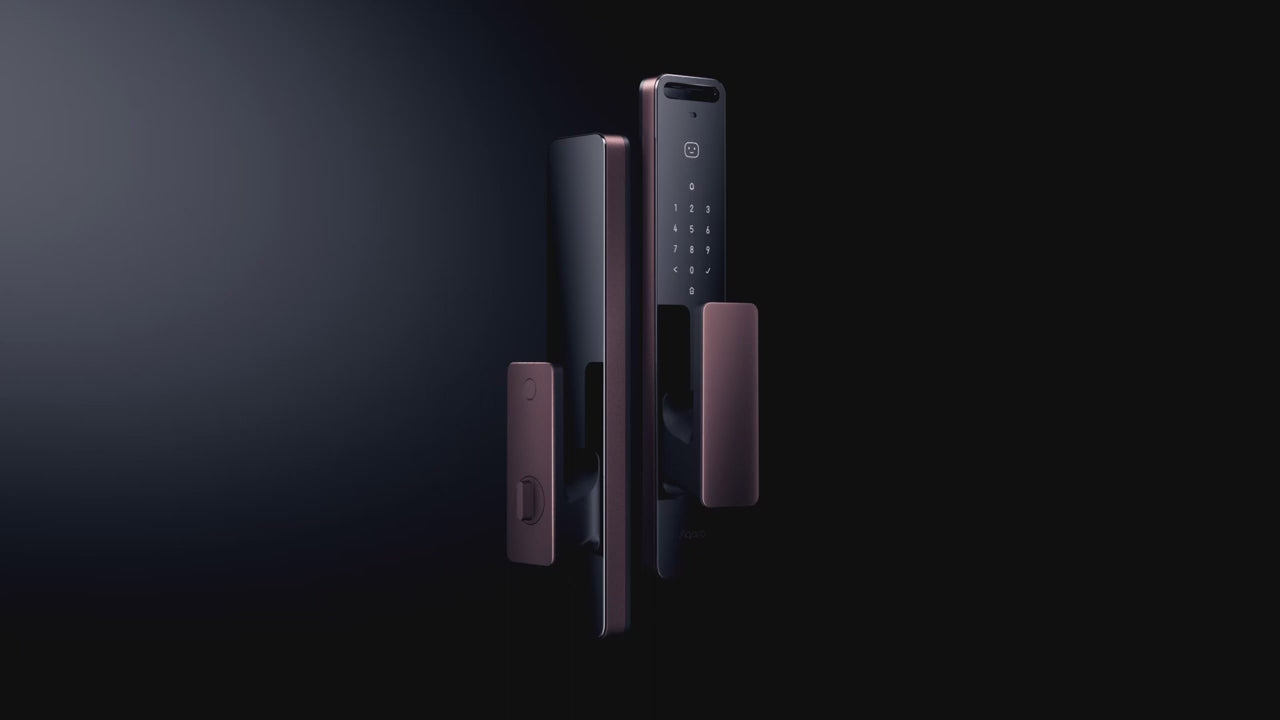
Aqara D200i 是一款安全性极高的智能门锁,采用符合人体工程学的设计,并具备丰富的智能功能。它支持多种解锁方式:人脸识别、密码、NFC 标签、APP 和机械钥匙。此外,它还允许用户设置临时一次性密码和周期性密码。
新增功能包括支持 Apple Home Key*,只需将手机或手表轻触门锁即可解锁;此外,还配备第二块电池,确保更持久的安全保障。现在购买,即可获赠价值 80 美元的第二块电池,全面提升您的安全保障和安心体验!
Real installation photos from our customers.
| Model | ML-D01D |
|---|---|
| Lock Type | Mortise |
| Unlocking Methods | 3D Face Recognition, PIN Code, NFC Card, Apple Home Key, App/Bluetooth, Manual Key |
| Connectivity | Wi-Fi (2.4GHz, IEEE 802.11 b/g/n), Bluetooth 5.1, Zigbee, NFC built-in; remote/automation functions require an Aqara Hub (M1S, M2, G2H, G3, or E1 - sold separately) for Zigbee network connection |
| Power Source | Replaceable Lithium-Ion battery (7.25V, 1.5A); includes bonus second battery |
| Battery Life | Up to 4 months per charge |
| Warranty | 2 Year Parts and On-Site Warranty; 6-month battery warranty. Other accessories not included. |
| Fire-Rated Compatible | Yes |
| Dimensions | Outer Panel: 406 x 77 x 20mm; Inner Panel: 406 x 77 x 26mm |
| Net Weight | 4.4kg |
| Night Latch Mode | Deadbolt-style secondary lock, toggled via a dedicated button (press 3 seconds to activate/deactivate) |
| Operating Temperature | -10C ~ 55C |
| Operating Humidity | 0 ~ 93% RH, no condensation |
| IP Rating | IP52 (Face Module: IP64) |
| Ports | USB-C (5V, 2A) |
| Biometric & Access Capacity | Up to 50 face profiles, 50 PIN codes, 25 NFC devices |
| Security Certification | BCTC certified (financial-grade security); face recognition processing is local, on-device |
| Built-In Doorbell | Yes |
| What is in the Box | Outer Panel x1, Inner Panel x1, Lock Body x1, Mechanical Lock Cylinder x1, Emergency Key x2, Strike Plate x1, Accessory Package x1, Lithium Battery x2, Installation Diagram x1, User Manual x1 |
Frequently Asked Questions
Have questions? We're here to help you.
These are not included in the Aqara D200i (stand-alone usage) price:
- NFC tags which can be purchased from Interlock if some users such as elderly folks require the tags.
- An Aqara Hub for remote connectivity to Aqara D200i and integration with Apple Homekit / Home Key, Google Assist.
- Integration services for home automation platforms (can be provided by Interlock partners).
Aqara hub is not needed:
- for D200i standalone use i.e. Aqara Home App with Bluetooth connection to D200i lock.
- for D200i use with Apple Homekit (however, a hub is recommended for enhanced remote operations via Aqara App and Aqara Hub).
Aqara hub is needed:
- when D200i remote functions are needed (see other FAQ item).
- when D200i is used with Google Assist.
- for automation with other Aqara devices.
**Note:** D200i works only with Aqara Zigbee 3.0 Hubs, namely: Aqara models M1S, M2 hub, G2H, G3, E1. Older Aqara Hubs are not supported. Non-Aqara Zigbee hubs are not supported.
The Aqara D200i lock works with Apple HomeKit and Apple Home Key technology.
**Apple HomeKit Support:**
- Controlling this HomeKit-enabled Aqara D200i lock away from home or for automation requires an Apple Home hub, which can be an Apple TV (generation 4 with tvOS 12.0+), an iPad (with iOS 12.0+), or a HomePod.
- Apple HomeKit must be in place. Refer to Apple HomeKit documentation.
**Apple Home Key Support:**
- User devices: iPhone (iOS 15 or higher) or an Apple Watch (OS 8 or higher) is required.
- After adding the Aqara D200i Smart Door Lock to Apple HomeKit, a virtual door card (an Apple Home Key) will be generated in the Apple Wallet.
- Apple HomeKit now only allows a single user to access the Home Key. However, if the family also uses Apple HomePod or Apple TV, the Home Key can be shared by inviting the family member via Apple ID.
- The Aqara D200i Apple Home Key will automatically appear on users' devices when they are invited into the HomeKit setup.
**Note:** An Aqara Hub is not required for Apple HomeKit integration, but it is recommended for enhanced remote Aqara D200i lock functions via Aqara App.
Unless stated otherwise, the following remote functions require connectivity setup to Aqara D200i via an Aqara Hub:
- **Remote One-Time-Use pin code** via Aqara Home App. *(Aqara Hub is not required.)*
- **Remote Periodic-Time pin code** via Aqara Home App.
- **Remote notifications and logs** on Aqara Home App.
- **Remote unlock** via Aqara Home App, Apple HomeKit, and Google Assist.
**Note:** Other lock functions can only be done via Aqara Home App onsite (via Bluetooth).
- **One-Time-Use pin code** valid for 20 minutes can be created via Aqara Home App.
- **Periodic-Time pin code** (start date/time - end date/time) can be created via Aqara Home App.
*Example: Between 9 AM - 1 AM, Jan 1, 2025.*