


Note: Product visuals are presented for illustrative purposes only and may vary slightly in colour, finish, proportions, and final installed appearance. For the most realistic representation, please refer to our Customer Gallery featuring actual installation photos.




Why it matters
Built for how you actually get home.
Built Specifically for Glass Doors
The Interlock Mercury GD1 is designed around the structural needs of a glass door, with drill-free installation on frameless glass (or a drilled fit on a wooden door) and a mechanical key kept on hand for emergencies — glass doors present different mounting and structural challenges to a standard wooden or metal door, and this lock is engineered for that from the outset rather than adapted after the fact.
Ways to Unlock
From outside: fingerprint, a card-plus-PIN combination, facial ID, or the mechanical key. From inside: a simple press-button release, a mechanical turn-knob, or app and Bluetooth remote unlock via the TTLock app — a genuinely full spread of access methods to suit different household members, from tech-comfortable adults to children who'd rather tap a card, with plenty of registration room for a busy household.
Never Locked Out
An external mechanical key (two are included) ensures you can always get in during an emergency — low battery, a forgotten PIN, or a system hiccup — and a USB-C emergency charging port lets you power the lock temporarily with a power bank if the battery runs flat completely.
Access Management
Periodic PIN codes and temporary unlock windows suit guests or contractors, and remote unlocking comes with full activity logs so you can see exactly who accessed the door and when. A built-in doorbell alerts you when visitors arrive, without needing a separate device installed alongside the lock, and a rechargeable battery keeps the whole system running for months between charges.
Real installation photos from our customers.
| Model | Interlock Mercury GD1 |
|---|---|
| Lock Type | Rim (Glass Door Digital Lock) |
| Unlocking Methods | Outside: Fingerprint, Card+PIN, Facial ID, Mechanical Key. Inside: Press button, Mechanical turnknob, App/Bluetooth remote unlock |
| Connectivity | Bluetooth (app remote unlock via TT Lock app) |
| Power Source | Rechargeable lithium battery, 7.4V nominal (6.4V-8.4V), 2500mAh / 18.5Wh; 5V/2A USB Type-C emergency power |
| Battery Life | Up to 4 months under typical use; we recommend recharging monthly |
| Warranty | 1 year (onsite, product & battery warranty) |
| Dimensions | Front Panel: 176mm (H) x 72mm (W) x 20mm (thickness); Rear Panel: 72mm (W) x 38mm (thickness) |
| Material | Shell: ABS + Alloy. Lock Tongue: 304 Stainless Steel |
| Product Weight | Approx. 2.5kg per piece |
| Door Seam Requirement | Greater than 3mm and less than 15mm |
| Installation Type | Drill-free glass door installation, or drilled wooden door installation |
| Operating Temperature | -20C to 55C |
| Operating Humidity | < 93% RH |
| Fingerprint Capacity | Up to 100 |
| Card + PIN Capacity | Up to 900 (combined) |
| Facial ID Capacity | Up to 50 |
| Mechanical Key | 2 keys included |
Frequently Asked Questions
Have questions? We're here to help you.
The Interlock Mercury GD1 is best suited for glass doors in homes, offices, private rooms, clinics, retail spaces, event venues, and selected commercial spaces. It is designed for users who need a digital lock specifically made for glass door applications.
The Mercury GD1 is designed specifically for glass doors, unlike standard digital locks that are usually made for wooden swing doors. It supports multiple access methods while maintaining a sleek design that suits modern glass door setups.
Yes. The Mercury GD1 is designed for selected glass doors, including suitable framed and frameless glass door setups. Final compatibility depends on the glass door type, thickness, frame design, and installation clearance.
Not every glass door is suitable. Compatibility depends on the glass thickness, door structure, frame condition, lock area, door alignment, and available clearance. A photo-based compatibility check is recommended before confirming installation.
No. The Mercury GD1 is designed for glass doors. For wooden doors, metal gates, or sliding doors, a dedicated Mercury door, gate, or sliding lock model would be more suitable.
From the outside, the Mercury GD1 supports fingerprint, passcode, NFC card or tag, mechanical key, facial recognition, and app or Bluetooth unlock.
From the inside, the Mercury GD1 supports the open button, mechanical turn knob, and app or Bluetooth unlock.
Yes. The Mercury GD1 supports fingerprint unlocking, allowing users to unlock the glass door quickly without using keys.
Yes. The Mercury GD1 supports facial recognition, allowing users to unlock with face access where supported and configured.
Yes. The Mercury GD1 supports PIN code access, allowing users to unlock with a passcode. This is useful for family members, staff, guests, or shared-space users.
Yes. Through the app, the Mercury GD1 can support periodic PIN codes and temporary unlock periods. This is useful for visitors, cleaners, contractors, helpers, event venues, offices, and short-term access needs.
Yes. The Mercury GD1 supports NFC card or tag access. This is useful for staff, children, elderly users, or anyone who prefers tap-to-unlock access.
Yes. The Mercury GD1 supports app control through Bluetooth. You can use the app to manage access, check logs, and create selected PIN code settings where supported.
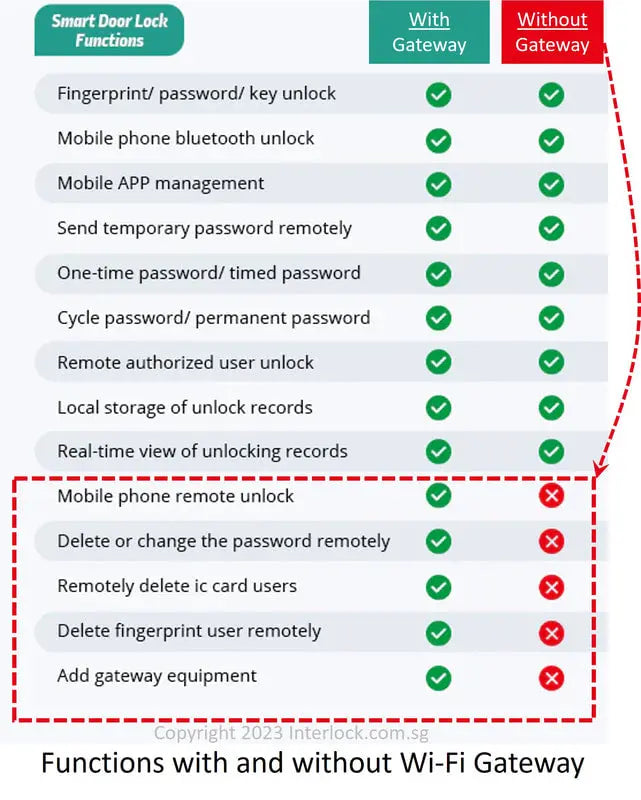
Remote unlocking requires the optional WiFi gateway add-on. Without the WiFi gateway, app control is mainly Bluetooth-based and works when you are within Bluetooth range.
A WiFi gateway is not required for basic lock use. However, if you want remote unlocking or cloud-based remote management when you are away from the property, the WiFi gateway is required as an add-on.
Yes. The Mercury GD1 supports access logs through the app, allowing you to monitor entry history and review who unlocked the glass door, depending on the app setup.
Yes. The Mercury GD1 can support attendance-related functions through the app ecosystem where configured. This may be useful for offices, staff rooms, clinics, studios, or selected commercial spaces.
Yes. The Mercury GD1 includes an in-built doorbell, allowing visitors to alert users at the glass door.
Yes. The Mercury GD1 includes external mechanical key access. This is useful as a backup method during emergencies, such as low battery, forgotten PIN, fingerprint issues, or app access problems.
If the battery is depleted, you can temporarily power the Mercury GD1 using a USB-C power bank through the emergency charging port. You can also use the mechanical key as a backup access method.
Yes. The Mercury GD1 has a USB-C emergency charging port. If the battery is depleted, you can connect a portable power bank temporarily to power the lock and unlock the glass door.
Yes. The Mercury GD1 includes 2 mechanical keys for emergency or backup access.
Yes. The Mercury GD1 includes 2 tags, which can be used for convenient tap-to-unlock access.
Yes. The Mercury GD1 can be suitable for elderly users because it supports multiple access methods, including fingerprint, PIN code, NFC tag, mechanical key, facial recognition, and app or Bluetooth unlock. NFC tags may be especially simple for users who do not want to remember PIN codes.
Yes. Children can use suitable access methods such as NFC tags, PIN codes, fingerprint, or facial recognition depending on their age and family preference.
Yes. The Mercury GD1 can be suitable for offices, clinics, studios, retail spaces, private rooms, event venues, and selected commercial areas with compatible glass doors.
Basic lock functions do not require a paid subscription. However, selected TTLock premium features such as advanced cloud management, web console functions, bulk export, long-term cloud data backup, and property management integrations may require paid access.
You should send clear photos of the front and back of the glass door, the side profile, the frame or frameless edge, the current lock area, the door alignment, and the area where the lock will latch. This helps our team check whether the GD1 can be installed safely and properly.
Yes. Installation is included for the Mercury GD1. Before installation is confirmed, our team will still need to check your glass door photos to make sure the glass type, frame design, lock area, door alignment, and clearance are suitable.
The Mercury GD1 comes with 1 year local warranty. Warranty coverage may depend on usage conditions, installation conditions, and whether the lock is used within the recommended environment.
The Mercury GD1 is suitable for users who need a digital lock for selected glass doors and want fingerprint, PIN code, NFC tag, mechanical key, facial recognition, app or Bluetooth access, temporary PIN codes, access logs, built-in doorbell, and USB-C emergency power support.