


Note: Product visuals are presented for illustrative purposes only and may vary slightly in colour, finish, proportions, and final installed appearance. For the most realistic representation, please refer to our Customer Gallery featuring actual installation photos.


为什么重要
为您真实的回家方式而设计。
Interlock Mercury SD1 是一款专为滑动门设计的尖端智能锁。它拥有六种灵活的解锁方式——人脸识别、指纹识别、刷卡、密码、App 控制和机械钥匙——即使在紧急情况下也能确保无缝访问和控制。其智能设计集成了外置机械钥匙和 USB-C 应急充电端口,为现代家居和办公场所提供可靠的性能。Mercury SD1 适用于私人活动场所、办公室或日常应用,堪称一流的智能锁系统。
Real installation photos from our customers.
| Model | Interlock Mercury SD1 |
|---|---|
| Lock Type | Rim (Sliding Glass Door Digital Lock) |
| Unlocking Methods | Outside: Fingerprint, Card+PIN, Facial ID, Mechanical Key. Inside: Press button, Mechanical turnknob, App/Bluetooth remote unlock |
| Connectivity | Bluetooth (app remote unlock via TT Lock app) |
| Power Source | Rechargeable lithium battery, 7.4V nominal (6.4V-8.4V), 2500mAh / 18.5Wh; 5V/2A USB Type-C emergency power |
| Battery Life | Up to 4 months under typical use; we recommend recharging monthly |
| Warranty | 1 year (onsite, product & battery warranty) |
| Dimensions | Front Panel: 176mm (H) x 72mm (W) x 36mm (thickness); Rear Panel: 46mm (W) x 20mm (thickness) |
| Material | Shell: ABS + Alloy. Lock Tongue: 304 Stainless Steel |
| Product Weight | Approx. 2.5kg per piece |
| Door Seam Requirement | Greater than 3mm and less than 15mm |
| Installation Type | Drill-free glass door installation |
| Clutch Mechanism | Blocked automatic start (anti-forced rotation) |
| Operating Temperature | -20C to 55C |
| Operating Humidity | < 93% RH |
| Fingerprint Capacity | Up to 100 |
| Card + PIN Capacity | Up to 900 (combined) |
| Facial ID Capacity | Up to 50 |
| Mechanical Key | 2 keys included |
| Fingerprint Sensor Resolution | >= 560 DPI |
Frequently Asked Questions
Have questions? We're here to help you.
The Interlock Mercury SD1 is best suited for homeowners, offices, private rooms, and event or commercial spaces that need a digital lock for a sliding door. It is designed for selected glass or wooden sliding doors where the door structure and clearance are suitable.
The Mercury SD1 is designed specifically for sliding doors, unlike standard digital door locks that are usually made for swing doors. It supports multiple access methods while maintaining a slim, practical design for sliding-door applications.
No. The Mercury SD1 is designed for sliding doors. For normal wooden swing doors, a dedicated digital door lock such as a Mercury X-series or V-series model would be more suitable.
Yes, the Mercury SD1 can be suitable for selected glass sliding doors, depending on the glass door type, thickness, frame design, and installation clearance. A compatibility check is required before confirmation.
Yes, the Mercury SD1 can be suitable for selected wooden sliding doors, depending on the door thickness, frame alignment, lock area, and sliding-door track condition.
Not every sliding door is suitable. Compatibility depends on the door material, door thickness, frame design, sliding track condition, available lock area, and whether there is enough clearance for the lock to operate properly.
From the outside, the Mercury SD1 supports fingerprint, passcode, RFID card or tag, mechanical key, facial recognition, and app or Bluetooth unlock.
From the inside, the Mercury SD1 supports the open button, mechanical turn knob, and app or Bluetooth unlock.
Yes. The Mercury SD1 supports fast fingerprint unlocking, allowing users to unlock the sliding door quickly without searching for keys.
Yes. The Mercury SD1 is facial-recognition ready, allowing users to upgrade to face recognition for more convenient keyless access where supported.
Yes. The Mercury SD1 supports PIN code access, allowing users to unlock with a passcode. This is useful for family members, staff, guests, or shared-space users.
Yes. Through the app, the Mercury SD1 can support one-time or timed PIN codes. This is useful for visitors, cleaners, helpers, co-living spaces, rental rooms, offices, or event venues.
Yes. The Mercury SD1 supports RFID card or tag access. This is useful for children, elderly users, staff, or anyone who prefers tap-to-unlock access.
Yes. The Mercury SD1 supports app control through Bluetooth. You can use the app to manage access, check logs, and create selected PIN code settings when supported.
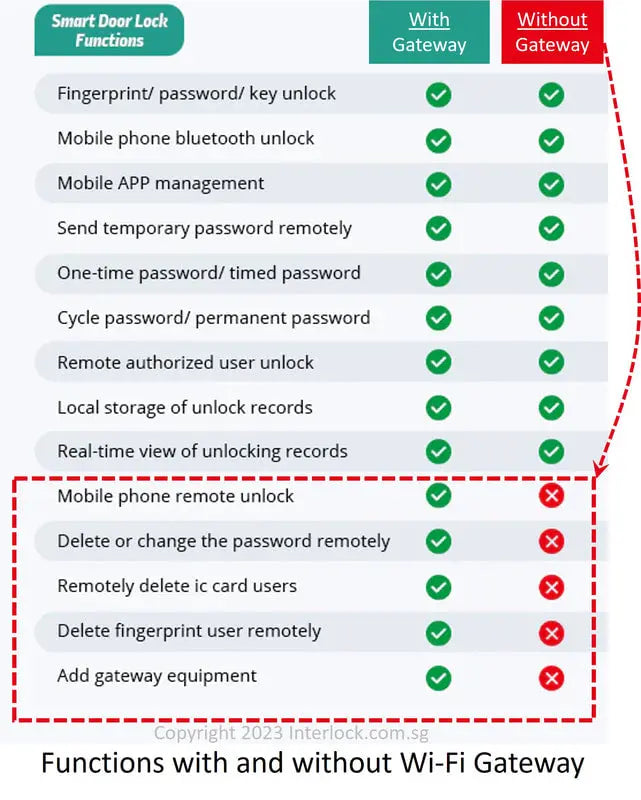
Remote unlocking requires the optional WiFi gateway add-on. Without the WiFi gateway, app control is mainly Bluetooth-based and works when you are within Bluetooth range.
A WiFi gateway is not required for basic lock use. However, if you want remote unlocking or cloud-based remote management when you are away from the property, the WiFi gateway is required as an add-on.
Yes. The Mercury SD1 supports visitor and entry logs through the app, allowing you to track who entered and when, depending on the app setup.
Yes. The Mercury SD1 supports auto-lock through the app. This helps ensure the sliding door locks automatically after closing, reducing the chance of forgetting to lock it manually.
Yes. The Mercury SD1 includes a tamper alarm that can trigger during forced-entry attempts or unusual interference with the lock.
Yes. The Mercury SD1 supports silent mode through the app, allowing access tones to be softened for quieter operation at night or in shared spaces.
The Mercury SD1 uses lithium rechargeable batteries and can last up to 6 months under normal usage, depending on usage frequency, battery quality, environment, and door condition.
Yes. The Mercury SD1 app shows your battery health so you can replace the batteries before they are fully depleted.
If the battery is depleted, you can temporarily power the Mercury SD1 using a USB-C power bank through the emergency port. You can also use the mechanical key as a backup access method.
Yes. The Mercury SD1 has a USB-C emergency power port. If the batteries are depleted, you can connect a portable power bank temporarily to power the lock and unlock the sliding door.
Yes. The Mercury SD1 includes 2 mechanical keys for emergency or backup access.
Yes. The Mercury SD1 includes 2 tags, which can be used for convenient tap-to-unlock access.
Yes. The Mercury SD1 can be suitable for elderly users because it supports multiple access methods, including fingerprint, PIN code, RFID tag, mechanical key, and app or Bluetooth unlock. RFID tags may be especially simple for users who do not want to remember PIN codes.
Yes. Children can use suitable access methods such as RFID tags, PIN codes, or fingerprint access depending on their age and family preference.
Yes. The Mercury SD1 can be suitable for offices, private rooms, event spaces, and selected commercial areas with compatible sliding doors. For heavier access management needs, app functions, WiFi gateway use, and TTLock premium features may be considered.
Basic lock functions do not require a paid subscription. However, selected TTLock premium features such as advanced cloud management, web console functions, bulk export, and property management integrations may require paid access.
You should send clear photos of the front and back of the sliding door, the side profile, the sliding-door frame, the current lock area, the door track area, and the area where the lock will latch. If it is a glass sliding door, include photos showing the glass panel and frame design clearly.
Yes. Installation is included for the Mercury SD1. Before installation is confirmed, our team will still need to check your sliding door photos to make sure the door material, frame design, lock area, sliding track condition, and clearance are suitable.
The Mercury SD1 comes with 1 year local warranty. Warranty coverage may depend on usage conditions, installation conditions, and whether the lock is used within the recommended environment.
The Mercury SD1 is suitable for users who need a digital lock for selected sliding doors and want fingerprint, PIN code, RFID tag, mechanical key, app or Bluetooth access, optional facial recognition, access logs, timed PINs, tamper alarm, auto-lock, and emergency USB-C power support.