


Note: Product visuals are presented for illustrative purposes only and may vary slightly in colour, finish, proportions, and final installed appearance. For the most realistic representation, please refer to our Customer Gallery featuring actual installation photos.


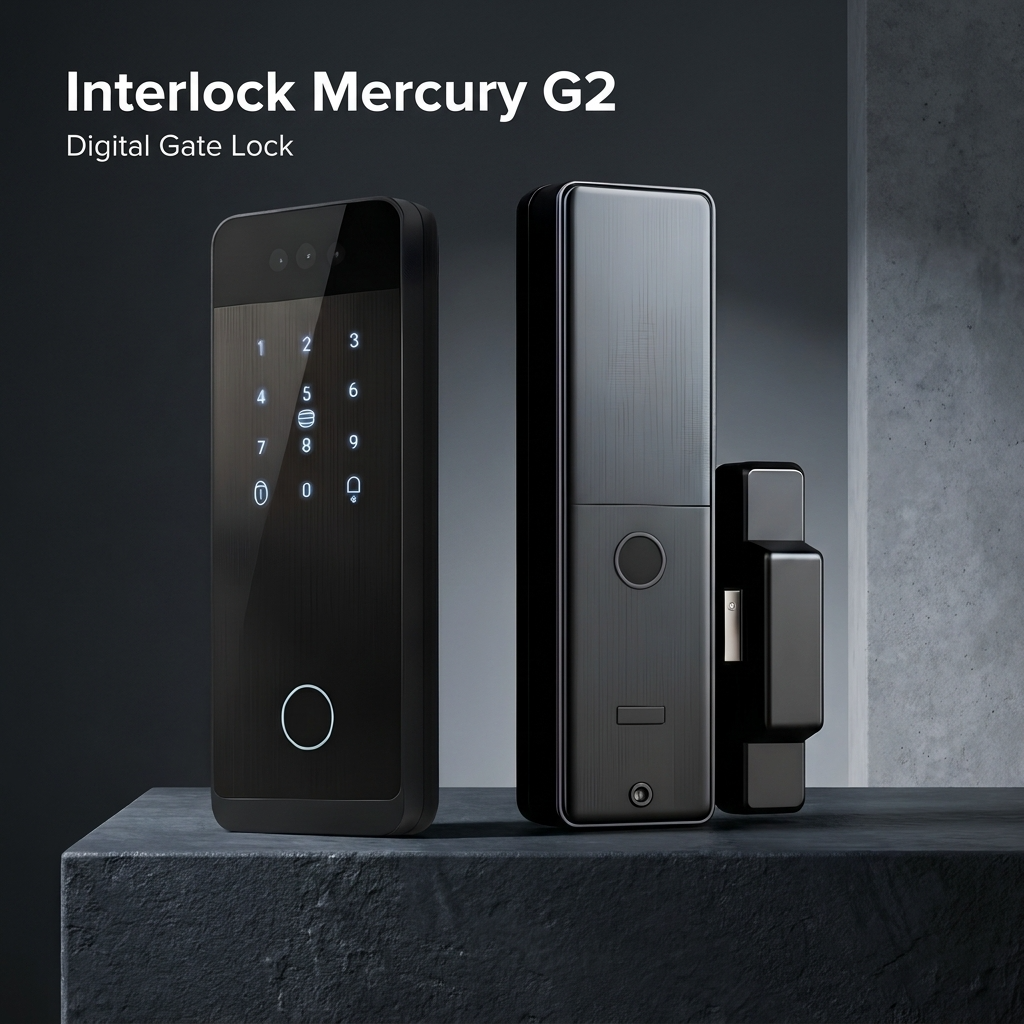
为什么重要
为您真实的回家方式而设计。
我们的 Interlock Mercury G2 智能门锁是专为新加坡组屋大门设计的多款智能数字门锁之一。它兼具先进的安全性能和现代化的便捷性,采用人脸识别系统,可在数秒内完成开锁。其广角镜头和高清分辨率即使在光线昏暗或环境恶劣的情况下也能确保可靠的识别。该门锁具备双同步功能,可与兼容的门锁配对,实现协同开锁。用户可通过涂鸦智能应用程序进行远程解锁,并可选择指纹、密码和刷卡等多种开锁方式。门锁内置 4200mAh 可充电电池,并配备 USB-C 紧急充电接口,提供可靠、智能的门禁安全保障和多样化的控制方式。
Please check the following requirements before purchase. If unsure, send us your door and gate photos on WhatsApp and our team will confirm compatibility before installation.
Distance Between Door & Gate
Minimum Distance Required: >40mm
Gate Thickness
Recommended Gate thickness: 25-40mm
Gate Gap
Gap Requirement: 4-8mm
Real installation photos from our customers.
| Model | Interlock Mercury G2 |
|---|---|
| Lock Type | Rim (Gate Lock) |
| Unlocking Methods | Face Recognition, Palm Vein, Fingerprint, Password, RFID/IC Card, Mechanical Key |
| Connectivity | Wi-Fi (2.4GHz only, Tuya Smart App); remote unlock supported |
| Power Source | 7.4V, 4200mAh rechargeable lithium battery; 5V/2A USB Type-C emergency power |
| Battery Life | Up to 3 months under typical use; we recommend recharging monthly |
| Warranty | 1 year (onsite, product & battery warranty) |
| Color | Matte Black |
| Dimensions | Front Panel: 193mm (H) x 22mm (W); Rear Panel: 33mm (W); Lock Catch: 142mm (H) x 33mm (W); Battery Holder Panel: 233mm (H) x 75mm (W) |
| Product Weight | Approx. 1.7kg |
| Face Recognition Capacity | Up to 50 |
| Palm Vein Capacity | Up to 50 |
| Fingerprint Capacity | Up to 200 fingerprints |
| Password / Card Capacity | Up to 1000 groups (combined) |
| Fingerprint Sensor | Semiconductor biometric recognition, <= 0.3 second recognition speed |
| Recognition Accuracy | False Acceptance Rate <= 0.0001%, False Rejection Rate <= 0.0001% |
| Static Power Consumption | <= 350uA |
| Operating Temperature | -20C to +60C |
| Dual Sync | Supports synchronized pairing with a compatible Mercury door lock |
| Cloud Storage | Complimentary video cloud storage trial; photos free (rolling 14-day); local storage also supported without subscription |
Frequently Asked Questions
Have questions? We're here to help you.
The Interlock Mercury G2 is best suited for homeowners who want a smart gate lock with face recognition, app remote unlocking, built-in camera viewing, and multiple access methods. It is suitable for Singapore metal gate setups, including common HDB, condominium, and landed property gates.
The Mercury G2 combines facial recognition, palm vein recognition, fingerprint access, PIN code, NFC card or tag, app remote unlock, and a built-in camera. This gives homeowners both convenient unlocking and better visibility of activity at the gate.
Yes. The Mercury G2 supports facial recognition unlocking, allowing users to unlock the gate hands-free without needing to use fingerprint, PIN code, card, or app access.
Yes. The Mercury G2 supports palm vein recognition as one of its biometric unlocking methods. This is useful for users who prefer a contactless access method or who may not always get consistent fingerprint recognition.
From the outside, the Mercury G2 supports fingerprint, passcode, NFC card or tag, facial recognition, palm vein recognition, and remote unlock through the app or WiFi.
From the inside, the Mercury G2 supports fingerprint unlocking, mechanical key access, and remote keyfob controller unlocking.
Yes. The Mercury G2 supports remote unlocking through the Tuya app when the lock is connected to WiFi. This allows you to manage access and unlock the gate from your smartphone.
Yes. When connected to WiFi, the Mercury G2 can support remote unlocking through the app. This is useful for trusted family members, helpers, or visitors, but you should only unlock remotely after confirming who is at the gate.
Yes. The Mercury G2 has a built-in HD camera with a wide-angle view. This helps you view visitors and gate activity through the app.
The 144° wide-angle camera gives a wider view of the gate area, making it easier to see visitors and activity near your entrance. This is useful for homeowners who want better visibility before unlocking the gate.
Yes. The Mercury G2 supports wide-angle viewing with night vision, helping improve visibility and face recognition in low-light conditions.
Yes. The Mercury G2 has a built-in doorbell, allowing visitors to signal directly from the gate. Notifications can be pushed to the mobile app depending on the app setup and internet connection.
Yes. The Mercury G2 supports app-based remote viewing when connected to WiFi, allowing you to check gate activity through your smartphone.
Yes. The Mercury G2 supports mobile notifications for selected gate activity, doorbell use, and low-battery alerts depending on the app configuration.
Yes. The Mercury G2 can support access records and selected activity logs through the app, helping you keep track of gate usage.
Yes. The Mercury G2 supports anti-peep virtual password entry, which allows you to enter extra digits before or after the correct PIN to reduce the risk of someone seeing your actual passcode.
Yes. The Mercury G2 includes illuminated PIN keys, making it easier to enter your passcode at night or in dim lighting.
Yes. The Mercury G2 can be paired with a compatible door lock for dual sync unlocking, allowing coordinated entry between your gate lock and door lock where supported.
Basic lock functions do not require a paid cloud video subscription. The Mercury G2 includes a complimentary cloud storage trial for video recordings, and continued cloud video storage may require an optional subscription after the trial.
The Mercury G2 includes a complimentary trial for cloud video recording. After the trial, cloud video storage may require a subscription, but videos can still be stored locally where supported.
Yes. The Mercury G2 supports cloud image storage for recent snapshots at no extra charge, depending on the app setup. Photos may be kept on a rolling basis and automatically deleted after the supported storage period.
The Mercury G2 uses a 4200mAh rechargeable battery. It is designed with smart power-saving features and low-battery notifications to reduce maintenance and avoid unexpected battery depletion.
The Mercury G2 provides low-battery alerts and an emergency USB-C charging port. If the battery is depleted, you can temporarily power the lock using a portable power bank to regain access.
Yes. If the lock battery is depleted, you can use the emergency USB-C charging port with a portable power bank for temporary activation. This is meant for emergency access, after which the battery should be recharged.
The Mercury G2 needs a dedicated 2.4 GHz WiFi network with its own name (unique SSID). If your router combines 2.4 GHz and 5 GHz under one network name, set up a separate 2.4 GHz network before installation, as combined networks may not pair. The signal also needs to reach the gate. Note: Some WiFi 7 routers have trouble pairing with smart locks, so a compatible 2.4 GHz network may be needed.
Yes. WiFi is mainly needed for remote app features. If WiFi is down, you can still use non-app access methods such as facial recognition, palm vein recognition, fingerprint, PIN code, NFC card or tag, remote controller, or mechanical key access where applicable.
Yes. The Mercury G2 is designed for common Singapore metal gate setups, including HDB gates. However, compatibility still depends on the actual gate design, lock area, gate gap, and installation clearance.
Yes. The Mercury G2 can be suitable for condominium and landed property metal gates, depending on the gate structure and available installation space. A compatibility check is recommended before purchase.
Not every metal gate is suitable. Some gates may have limited lock space, narrow gate-to-door clearance, unusual frame designs, or installation restrictions. A photo-based compatibility check is recommended before confirming installation.
You should send clear photos of the front and back of the gate, the current lock area, the gate frame, and a photo showing the door and gate closed together. If possible, also provide the gate-to-door distance so our team can check installation clearance.
Yes. The Mercury G2 can be suitable for elderly users because it offers multiple access methods, including facial recognition, palm vein recognition, fingerprint, card or tag, PIN code, app unlock, remote controller, and mechanical key access. This gives the household more flexibility if one method is less convenient.
Yes. Children can use suitable access methods such as card or tag, PIN code, fingerprint, or palm vein recognition depending on their height, habits, and family preference. For younger children, parents may prefer simpler access methods such as tags or PIN codes.
Yes. The Mercury G2 includes 2 mechanical keys for emergency or backup access.
Yes. The Mercury G2 includes 2 tags that can be used as a convenient access method for household members.
Yes. The Mercury G2 includes 1 remote control, which can be used as one of the unlocking methods from inside the home.
The Mercury G2 is designed for Singapore gate environments, but it should still be protected from direct heavy rain exposure where possible. For unsheltered or highly exposed gates, it is best to check suitability with our team before purchase.
The Mercury G2 comes with 1 year local warranty. Warranty coverage may depend on usage conditions, installation conditions, and whether the lock is used within recommended environments.
Yes. Complimentary installation is included for the Mercury G2. Before installation is confirmed, our team will still need to check your gate photos to make sure your gate design, lock area, gate gap, and door-to-gate clearance are suitable.
The Mercury G2 is suitable for homeowners who want a smart gate lock with face recognition, palm vein recognition, remote app unlocking, built-in camera viewing, doorbell alerts, and multiple access methods. It is especially suitable for homes that want a feature-rich gate lock without needing the dual-camera setup of the Mercury G3.