




Note: Product visuals are presented for illustrative purposes only and may vary slightly in colour, finish, proportions, and final installed appearance. For the most realistic representation, please refer to our Customer Gallery featuring actual installation photos.


Why it matters
Built for how you actually get home.
A Straightforward, Well-Built Everyday Smart Lock
The Aqara A100 focuses on doing the fundamentals well: a fast handle-mounted fingerprint scanner, six ways to get in, and genuine multi-point locking, all backed by Apple HomeKit and Google/Alexa support. If the D100 and D200i are about adding new capabilities like cameras and face recognition, the A100 is about making the everyday basics — unlocking the door, securing it properly, and not running out of battery — as reliable as possible.
Ways to Unlock
Six access methods are supported: fingerprint, PIN code (permanent, one-time or periodic), NFC tag, mechanical key, the Aqara app, and Apple Home Key — giving every household member and every situation (deliveries, cleaners, guests) an appropriate access method. A one-time password that expires after a single use is ideal for a delivery or a repairman who only needs access once; a periodic password that only works on, say, Tuesday mornings suits a weekly cleaner without you needing to remember to disable it afterwards.
Instant, One-Motion Entry
The fingerprint reader sits right in the handle: a roughly 0.3-second scan and a roughly 0.5-second unlocking cylinder mean the whole sequence, from touch to open, happens in under a second and in a single natural motion — you're not standing at a separate keypad waiting before you can even reach for the handle. Apple Home Key works the same way for iPhone and Apple Watch owners: hold your device near the lock for an instant tap-to-unlock in Express Mode, or switch to a more secure mode that requires Face ID or a passcode first.
Multi-Point Locking
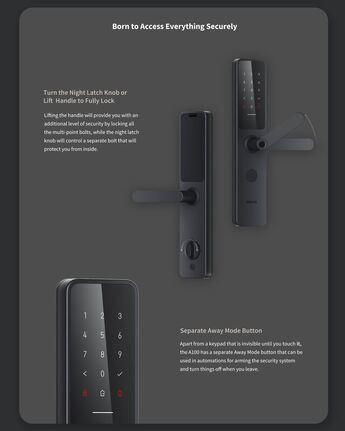
Lifting the handle engages every bolt in the door simultaneously — one door bolt, three main lock bolts and a master lock bolt — rather than relying on a single latch or a single deadbolt point. This is the same principle behind traditional multi-point mortise locks used on higher-security doors: more engagement points along the door frame means more resistance to prying or forcing the door at any single weak spot, which is a meaningfully different security proposition to a basic single-bolt smart lock. Damage sensors on the front panel flag tampering attempts, and the lock includes electromagnetic shielding against the kind of signal-interference attacks that can trip up less protected electronic locks.
Fire-Rated for HDB Doors
The A100 is fire-rated and suitable for installation on HDB fire-rated doors, so upgrading to a smart lock doesn't put you out of compliance with local building requirements — a real concern in Singapore, where many HDB main doors carry a fire-rating that certain hardware modifications can compromise if you're not careful about what you install.
Battery & Power
Eight AA batteries deliver up to 18 months of battery life on typical daily use — among the longest runtimes in the Aqara lineup, since the A100 doesn't need to power a screen, camera or rechargeable pack the way the camera-equipped models do. In practice that means you're looking at roughly one battery change every year and a half rather than every few months, which matters if you'd rather not think about the lock at all once it's installed. And even with the batteries fully depleted, the mechanical key or a USB-C power bank always gets you back inside.
Smart Home Integration
Works over Zigbee 3.0 and Bluetooth, with support for Apple HomeKit and Home Key alongside Google Assistant, so it fits into either ecosystem without needing a separate bridge for basic automation — useful if your household is split between iPhone and Android users, or you're not sure yet which smart home platform you'll standardise on. Real-time lock status and unlock notifications appear right in the Aqara Home or Apple Home app, and the lock can trigger automations on your other connected devices.
Real installation photos from our customers.
| Model | ZNMS02ES (Smart Door Lock A100 Zigbee) |
|---|---|
| Lock Type | Mortise |
| Unlocking Methods | Fingerprint, PIN Code (including one-time and periodic PINs), NFC, Apple Home Key, App/Bluetooth, Manual Key |
| Connectivity | Zigbee, Bluetooth 5.0, NFC built-in; remote/away-from-home access requires an Aqara Hub (Zigbee) - see product FAQ for full requirements |
| Power Source | 8x AA dry batteries (6V); USB-C emergency power supply (5V) |
| Warranty | 2 Year Parts and On-Site Warranty. Other accessories not included. |
| Dimensions | 375 x 77 x 23.6mm |
| Net Weight | 3.6kg |
| Manufacturer | Lumi United Technology Co., Ltd. |
| Operating Temperature | -25C ~ 55C |
| Operating Humidity | 0 ~ 93% RH, non-condensing |
| Fire-Rated Door Use | Certified |
| Fingerprint Capacity | Up to 50 |
| Card Capacity | Up to 50 |
| Password Capacity | 6-10 digit unlock passwords, plus support for virtual/dummy-digit passwords (garbled digits added before/after the real password to prevent onlookers reading it) - combined unlock + dummy digits within 20 digits total |
Frequently Asked Questions
Have questions? We're here to help you.
These are not included in the A100 lock (stand-alone usage) price:
- NFC tags which can be purchased from Interlock if some users such as elderly folks require the tags.
- An Aqara Hub for remote connectivity to A100 and integration with Apple Homekit / Home Key, Google Assist, etc.
- Integration services for home automation platforms (can be provided by Interlock partners).
Aqara hub is not needed:
- for A100 standalone use i.e. Aqara Home App with Bluetooth connection to A100 lock.
- for A100 use with Apple Homekit (however, a hub is recommended for enhanced remote operations via Aqara App and Aqara Hub).
Aqara hub is needed:
- when A100 remote functions are needed (see other FAQ item).
- when A100 is used with Google Assist.
- for automation with other Aqara devices.
**Note:** A100 works only with Aqara Zigbee 3.0 Hubs, namely: Aqara models M1S, M2 hub, G2H, G3, E1. Older Aqara Hubs are not supported. Non-Aqara Zigbee hubs are not supported.
The A100 lock works with Apple HomeKit and Apple Home Key technology.
**Apple HomeKit Support:**
- Controlling this HomeKit-enabled A100 lock away from home or for automation requires an Apple Home hub, which can be an Apple TV (generation 4 with tvOS 12.0+), an iPad (with iOS 12.0+), or a HomePod.
- Apple HomeKit must be in place. Refer to Apple HomeKit documentation.
**Apple Home Key Support:**
- User devices: iPhone (iOS 15 or higher) or an Apple Watch (OS 8 or higher) is required.
- After adding the Aqara Smart Door Lock A100 to Apple HomeKit, a virtual door card (an Apple Home Key) will be generated in the Apple Wallet.
- Apple HomeKit now only allows a single user to access the Home Key. However, if the family also uses Apple HomePod or Apple TV, the Home Key can be shared by inviting the family member via Apple ID.
- The A100 Apple Home Key will automatically appear on users' devices when they are invited into the HomeKit setup.
**Note:** An Aqara Hub is not required for Apple HomeKit integration, but it is recommended for enhanced remote A100 lock functions via Aqara App.
Unless stated otherwise, the following remote functions require connectivity setup to A100 via an Aqara Hub:
- **Remote One-Time-Use pin code** via Aqara Home App. *(Aqara Hub is not required.)*
- **Remote Periodic-Time pin code** via Aqara Home App.
- **Remote notifications and logs** on Aqara Home App.
- **Remote unlock** via Aqara Home App, Apple HomeKit, and Google Assist.
**Note:** Other lock functions can only be done via Aqara Home App onsite (via Bluetooth).
- **One-Time-Use pin code** valid for 20 minutes can be created via Aqara Home App.
- **Periodic-Time pin code** (start date/time - end date/time) can be created via Aqara Home App.
*Example: Between 9 AM - 1 AM, Jan 1, 2025.*