


Note: Product visuals are presented for illustrative purposes only and may vary slightly in colour, finish, proportions, and final installed appearance. For the most realistic representation, please refer to our Customer Gallery featuring actual installation photos.


为什么重要
为您真实的回家方式而设计。
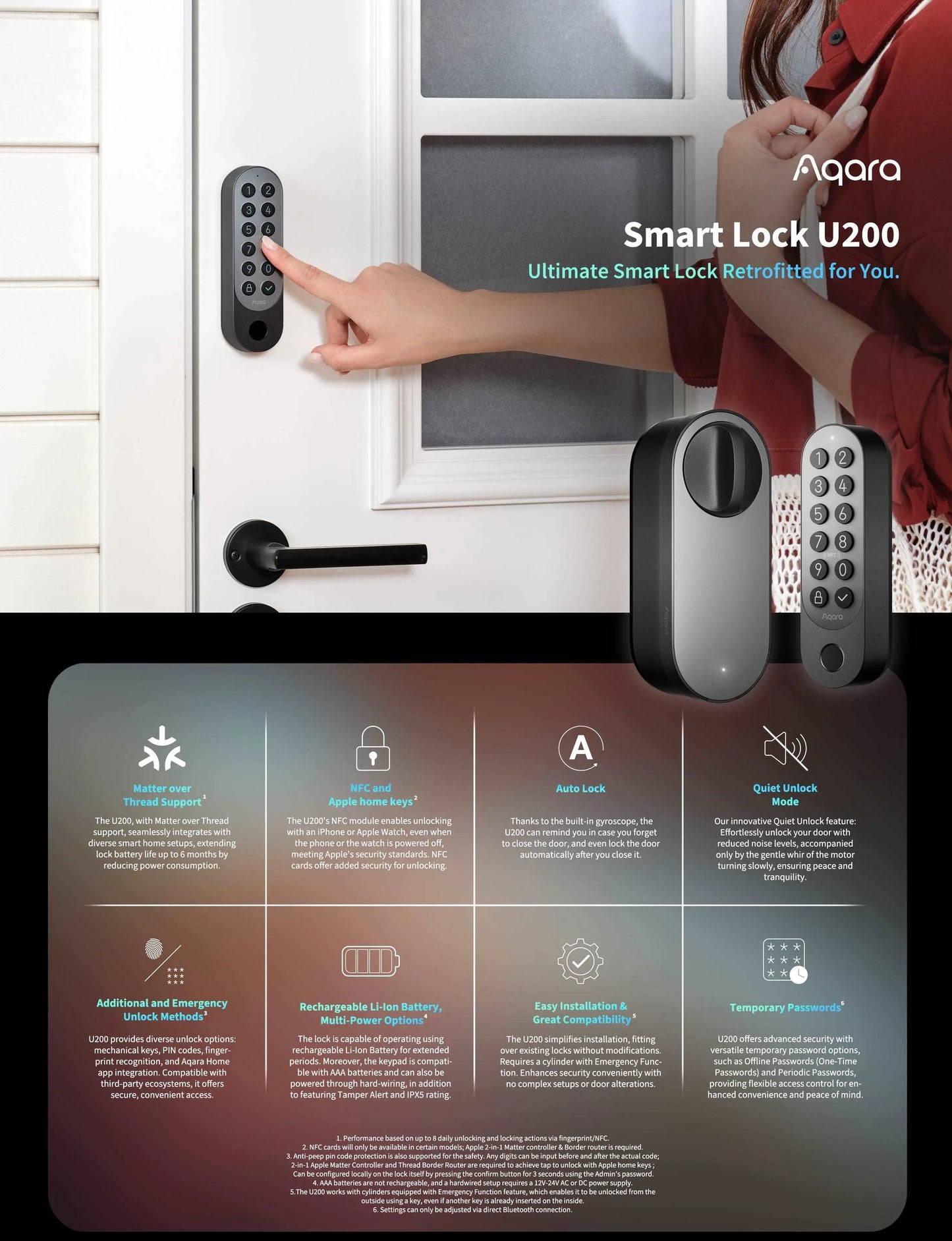
使用 Aqara U200 智能锁套件,提升您家的安全性和便利性。作为一款改造方案,它是唯一一款无需钻孔即可安装的适用于新型组屋式大门和门的智能锁,完美保留了大门/门的原貌。
如果您将来决定移动锁的位置,您的大门/门将保持不变,这对于不愿进行永久性改造的房主来说非常理想。
U200 提供多种解锁方式,包括 Apple Home Keys、指纹、NFC 和密码。它兼容 Matter over Thread,可与 Apple Home 和 Google Home 等平台无缝集成。其 IPX5 防水设计,结合多种供电方式和可充电电池,确保在各种环境下都能可靠运行,适合室内外使用。
这款锁既可以安装在门上,也可以安装在栅栏上。
Real installation photos from our customers.
| Model | EL-D02D (Aqara Smart Lock U200 Kit) |
|---|---|
| Lock Type | Deadbolt; no-drill retrofit kit, installable on door or gate |
| Unlocking Methods | Apple Home Key, Fingerprint, NFC, PIN Code, App/Bluetooth, Manual Key |
| Connectivity | Thread, Bluetooth 5.1, NFC built-in; Matter over Thread for Apple Home and Google Home integration |
| Power Source | Lock body: Aqara rechargeable Li-ion battery, 7.4V; Keypad: 4x AAA (LR3) 1.5V batteries; also supports hardwired input (12-24V AC 0.2A 50/60Hz or 12-24V DC 0.5A) |
| Battery Life | Up to 6 months, based on up to 8 daily lock/unlock actions via fingerprint or NFC. Battery life may vary based on usage and conditions. |
| Warranty | 2 Year Parts and On-Site Warranty; 6-month battery warranty on the lock body's rechargeable battery (keypad AAA batteries not covered). Other accessories not included. |
| Dimensions | Lock: 62.3 x 60.6 x 152.5mm; Keypad: 42.7 x 33 x 146mm |
| IP Rating | IPX5 |
| Operating Temperature | -15C ~ 66C |
| Operating Humidity | 0 ~ 93% RH, no condensation |
| Cylinder Type | Retrofits over existing Euro profile cylinders and select Scandinavian cylinders; no drilling required |
| Security Features | AES encryption algorithm, fingerprint module encryption binding, Anti-Peep PIN Code Protection, Quiet Unlock Mode, Activity Log, Passage Mode, Do Not Disturb Mode |
| Smart Home Ecosystem | Native Matter over Thread; supports Apple Home, Google Home, and Amazon Alexa Matter controllers (Samsung SmartThings support planned post-launch) |
| What is in the Box | Smart Lock U200 x1, User Manual x1, Aqara Rechargeable Battery x1, Cylinder Adaptor Kit x1, Hexagon Screwdriver x1, USB-C to USB-A Cable x1, AAA Battery x4, 3M Sticker x1, EVA Pad Kit x1, Screw Kit x1, Power Bank Pouch x1, Replaceable Panel x1, NFC Card x1, AA Battery Adapter x1 |
Frequently Asked Questions
Have questions? We're here to help you.
For Aqara Home users, you can calibrate the lock either through the app by selecting 'Calibrate Lock' under settings or by holding the Set button on the lock for 3 seconds. Matter users can also hold the Set button for auto-calibration after installation.
The U200 uses Matter over Thread, enabling compatibility with major smart home platforms and reliable, secure connections.
If you're using the Aqara Home app, a hub isn't necessary but is recommended for full remote control. For Matter integration, a Thread Border Router that supports Matter is required.
Connecting the U200 to the Aqara M3 Hub enables automation routines, remote locking and unlocking, and future firmware enhancements.
While basic features like locking and unlocking are accessible through third-party platforms, the Aqara Home app is needed for advanced settings such as auto-lock, quiet mode, and spring pull adjustments.
If the lock is already linked, enter pairing mode to rebind. If issues persist, resetting the lock may be necessary before reattempting the connection.
Invite other Apple users to your Home in the Apple Home app. They will automatically receive a door key in their Apple Wallet once added.
You can unlock via Apple Wallet by selecting the door card and tapping your iPhone or Apple Watch to the NFC area. You can also use shortcut mode for quicker access.
Remove the Home Key from your Wallet and re-add it via the Home app. If problems continue, sign out and back into iCloud, or reset the lock and add it again.
Apple currently does not support generating temporary access codes through the Home app.
Try updating the firmware, creating a new Home in the Home app, resetting the HomePod, or checking for Thread support. Make sure the passcode is between 6-10 digits.
A smartphone is required for initial setup and pairing, but once configured, the lock can operate independently using the keypad, fingerprint, or key.
No hub is required for local access via the Aqara Home app. However, remote access and advanced automation need an Aqara M3 Hub or Matter-compatible router.
Yes, one-time and periodic access codes can be set locally through Bluetooth. Remote scheduling requires the Aqara M3 Hub (available from H2 2024).
Hold both the Lock and Confirm buttons for 3 seconds and verify with your admin method. Matter users should also press the internal reset button for 3 seconds.
If you've forgotten your password, please reach out to Aqara customer support for assistance.
The lock sends a low battery alert at 20%. The keypad can still be used via Bluetooth, and the lock can be opened with a physical key.
Re-enrol your fingerprint as it may change over time. For children or elderly users, register multiple fingers and make sure hands are clean and dry.
On average, the battery lasts around 6 months with up to 8 operations per day. Actual lifespan may vary depending on usage.
Yes, the keypad can be powered using a 12V-24V AC/DC power source. Ensure professional installation for safety.
Quiet mode allows discreet unlocking by reducing motor sound. Activate it via the app or with button combinations on the keypad.
Auto-lock activates once the door is detected as closed. You can enable or adjust this in the Aqara Home app.
Geofencing will be added through a future firmware update to enable location-based automation.
After 10 incorrect entries, the keypad will be disabled for 30 minutes. Use the internal knob or app-based unlock to reset it.
Use the Aqara Home app to install updates. Matter users can update through the Apple Home app, but Aqara typically provides updates earlier.